
Providers
A provider is one named set of credentials for one CLI, kept apart from the CLI's own. Use one when two agents need to run the same CLI as two different accounts at once.
An agent with no provider runs its CLI exactly as you run it yourself.
Try it
- Make one account from your existing subscription.
hmz providers add claude/anthropic -w loginThis runs claude auth login here, with the paths pointed at the provider's own directory. The CLI's own login owns the terminal until it is done, and what it writes lands under ~/.humanize/providers/claude/anthropic/.
- Make a second account from somebody else's endpoint.
hmz providers add claude/deepseek -w gateway \
    -s ANTHROPIC_BASE_URL=https://api.deepseek.com/anthropic
-s answers one of the way's questions on the line rather than being asked. The rest is asked at the terminal, and a secret is not echoed — here, the token.
- Check what you made.
hmz providers listclaude/anthropic login -
claude/deepseek gateway ANTHROPIC_AUTH_TOKEN, ANTHROPIC_BASE_URL
codex/personal key -One line each: the account, the way it was made by, and the variables it sets. - marks a way that sets none.
- Run one flow as both accounts at the same time.
hmz exec -f official/flame_chase \
    -a claude@anthropic/claude-opus-5:max \
    -a claude@deepseek/deepseek-chat:high \
    "fix the build"
flame_chase hands the same task to two agents in turn, and both run the same claude. The first reads the subscription's tokens and refreshes them; the second dials the endpoint with the token you typed. Neither can read the other's credential file, and neither can read yours.
The problem it solves
A coding agent CLI signs in once. Claude Code keeps its account under ~/.claude, so every claude on this machine runs as whoever is signed in there. A flow that wants two of them on two accounts has two accounts wanting one directory.
A provider is the second directory.
Naming one on an agent
Two spellings name the same agent:
claude@deepseek/claude-opus-5:max
cli=claude,model=claude-opus-5,effort=max,provider=deepseek
A CLI is never spelled with an @ in it, so the CLI and the account are told apart wherever an agent is written. An @ with nothing after it is refused: it was typed to name an account, and running as whoever is at this machine is not that.
In Python the account is a field of the config:
ClaudeCodeAgentConfig(model="claude-opus-5", effort="max", provider="deepseek")At the prompt it is the account row of the sheet an agent is set up on: the second page of /flow, or a saved agent in /agents. It sits under the cli row, because an account belongs to one backend and what signs in to Claude Code is not what signs in to codex. Opening it lists that CLI's own accounts with as local first:
   Select the account its turns run as

   ❯ 1. as local                  signed in as you signed it in
     2. deepseek                  gateway · ANTHROPIC_AUTH_TOKEN, ANTHROPIC_BASE_URL
     3. work                      login

   a to make one · Enter to choose · Esc to cancel · s to search
as local is always the first row, and it is what every agent ran as before there were any accounts. a makes one without leaving the question. It runs the same walk /providers runs, minus the question the cli row has already answered, and comes back with the new account chosen.
What moves, and what does not
Only the credential files move. Sessions, settings and skills stay in the CLI's own home. A turn under a provider still shows up in a trace, still counts towards the cost readout, and still has the skills you installed.
~/.humanize/providers/claude/deepseek/
├── provider.json      what it was made by, and what a turn under it runs with
├── home/              the credential files the CLI keeps under its own home
│   ├── .credentials.json
│   └── .claude.json
└── user/              and the ones it keeps outside it
    └── .claude.json
Files are 0600 in a directory at 0700. They keep the names the CLI gave them, because the CLI writes them: a login run for a provider is the CLI's own login with those paths pointed here.
A turn under a provider is run with the other accounts' variables unset. An ANTHROPIC_API_KEY left in a shell profile is a key the CLI would rather have than the credential file it was signed in with. The turn would be taken as the wrong account with nothing looking wrong. So every variable that backend would read an account out of is cleared unless this provider set it.
The ways in
A way is one kind of account. hmz providers ways <cli> prints the list on this machine, and this machine is the one to trust.
| CLI | Ways |
|---|---|
claude | login, token, key, gateway, bedrock, vertex |
codex | login, device, key, token, gateway |
kimi | login, model |
pi | login |
opencode | login, wellknown, zen |
mimo | login, key |
| all of them | env — variables of your own |
A way with a command of its own is handed the terminal: its browser or its device code owns the screen until it is done, and what it writes lands in that account's directory rather than in the CLI's.
A way that is only answers keeps them as the variables the backend reads them under.
The full table, with what each way asks for, is in Providers › The ways in.
The commands
hmz providers list [<cli>]           # what there is
hmz providers ways <cli>             # how that backend can be signed into
hmz providers add <cli>/<name>       # make one: -w <way>, -s VAR=VALUE, --no-login, --also
hmz providers login <cli>/<name>     # sign an existing one in again
hmz providers show <cli>/<name>      # what it holds — never what the values are
hmz providers falls-back <cli>/<name> [<name>]   # which account a failed turn carries on under
hmz providers retry <cli>/<name> -n 3 -p exponential-jitter -t 120
hmz providers remove <cli>/<name>    # take it away, credentials and all
Non-interactive
A line with nobody at a terminal has to answer everything itself:
hmz providers add claude/deepseek -w gateway \
    -s ANTHROPIC_BASE_URL=https://api.deepseek.com/anthropic \
    -s ANTHROPIC_AUTH_TOKEN="$TOKEN"
--no-login writes one down without running the backend's own way in at all.
Values are never printed. show and list say which variables a provider sets, not what they are. A secret typed at the prompt is drawn as bullets and never shown back.

The models an account can run belong to that account. The CLI is asked as soon as one is made, because which models a turn may name depends on which subscription, key or gateway it runs under.
The answer is kept:
~/.humanize/providers/claude/deepseek/models.jsonA CLI that will not say does not fail the line; the account was made. r on the models sheet asks it again, and it is where you find out that the model you came for is not in the list.
In the interface
/providers lists all of them, grouped by CLI, with the way each was made by and the variables it sets:
   claude
   ❯ 1. deepseek                  gateway · ANTHROPIC_AUTH_TOKEN, ANTHROPIC_BASE_URL
     2. work                      login
     3. as local                  the CLI as this machine is already signed in · falls back to work

   codex
     4. personal                  key
5. as local the CLI as this machine is already signed in| Key | |
|---|---|
| enter | What there is to do with the account under the cursor |
| a | Make one: which CLI, then how to sign in, then what that way asks |
| d d | Take it away, credentials and all |
enter opens a menu of four rather than one letter apiece on the list. l, f and t were three keys to read off the bottom of the screen, and enter, which every list already means, did one of the four:
| correct what it holds | the answers its way in was made with, asked again |
| sign in again | its own way in, run again; it owns the terminal while it does |
| falls back to | which account a turn carries on under when this one fails |
| how it is tried again | how many tries, which wait, and how long in all |
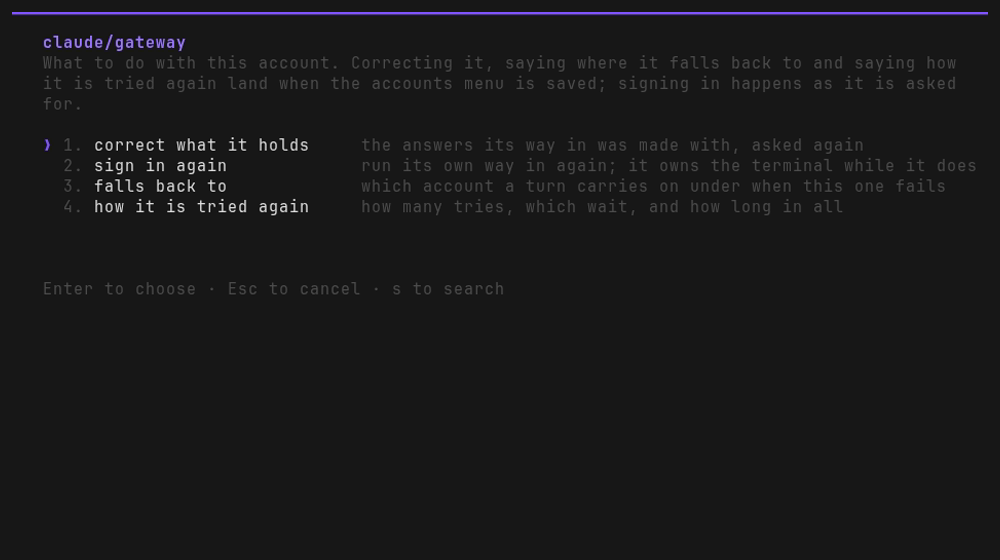
Making an account and signing one in happen as they are asked for, because a login owns the terminal while its browser or its device code has it, and something that has already happened is not a draft.
The other three are held with the removals until the menu is saved, as on every other menu: correcting one, saying where it falls back to and saying how it is tried again.
The account this machine is already signed into is as local, last under each CLI. It is offered only the bottom two.
The line under them says why rather than leaving two rows that do nothing: humanize did not make that account and keeps no credentials for it, so there is nothing to correct and nothing to sign in.
a asks which CLI first, because a backend's ways in are its own and the second question is only answerable once the first has been. The last row of that list is not a backend at all: a CLI of your own that speaks ACP, a backend from there on in this project and every other. Someone who cannot find their agent in the list finds that out while answering the question which CLI, which is where it is answered.
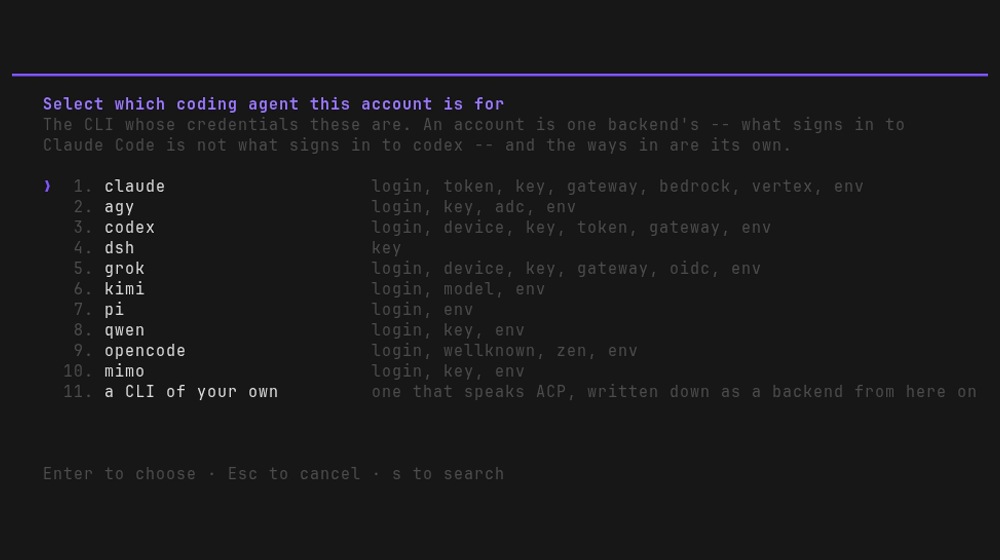
Nothing here is refused while a flow is running. An agent reads the account it was configured with once, so one made or taken away now is one the next run sees.
One account, several CLIs
A vendor's credential is the vendor's rather than the CLI's. An Anthropic key is an Anthropic key whether Claude Code, pi, opencode or mimocode is holding it, and a subscription token is one under whatever name each of them reads it under: CLAUDE_CODE_OAUTH_TOKEN on Claude Code, ANTHROPIC_OAUTH_TOKEN on pi.
So an account made for one backend is often an account several others could be run as, and making the same key four times by hand is four places to correct when it is rotated.
That is why it is asked at the moment the account exists. Making one that others could be run as asks which of them to write it down for as well, with the backends installed here already ticked and the rest listed and off.
An account is worth writing down before the CLI that will use it is on this machine. Correcting one asks the same question again, of the account as corrected.
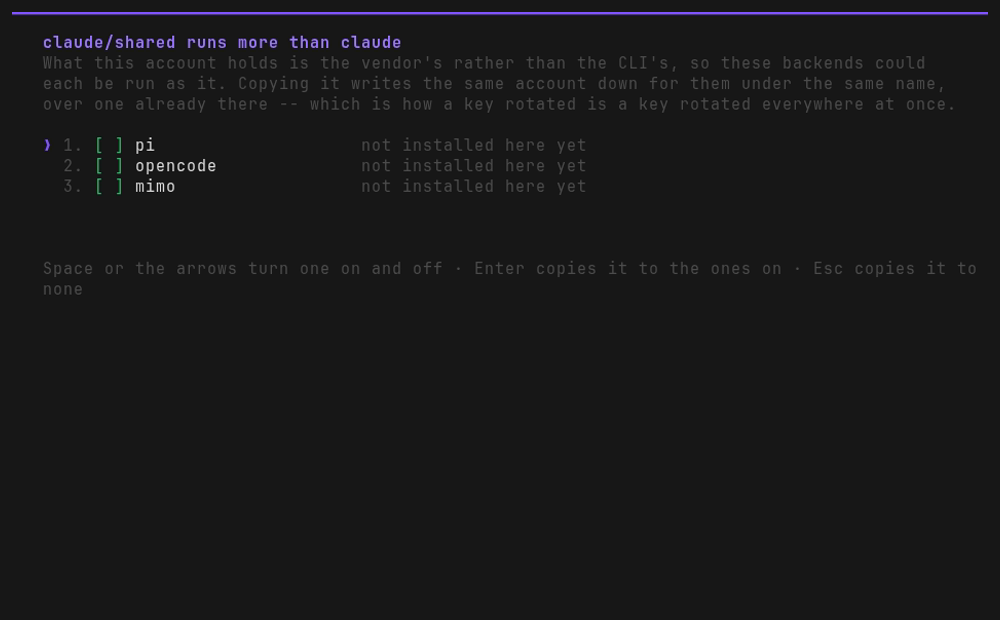
A copy is written down under the same name and over one already there, spelled as that backend reads it. What it reads as there is that backend's own way where one asks for exactly those variables, and variables of your own where it has none. So claude/shared made by key is pi/shared and opencode/shared made by env: the same key under three names.
So a rotated key is a key rotated in several places at once. The new key is typed once, into the account it was first made on, and the question after it writes it over the copies that are ticked.
What is ticked is the backends installed here. It is the same question as when the account was made, asked of the account as corrected, and it does not read which backends already hold a copy. A copy on a CLI that is not on this machine is therefore one still holding the old key unless somebody turns its row on, and nothing marks it as one: what each row says of its backend is whether it is installed here.
Which is worth a look before a rotation is trusted, a copy left behind being an account that is still there and still works. hmz providers list is where the copies are, the same name under another backend, and ticking one is what writes the new key over it.
What travels is variables. An account that is a subscription signed into travels nowhere: it is the CLI's own credential store in that CLI's own format, and nothing else can read it.
Neither does one holding a credential the other backend has no name for. Every variable has to land somewhere, or that backend is not offered the account at all.
On a command line it is a flag on add, and show says what else an account could run:
hmz providers add claude/shared -w key --also pi,opencode   # or --also all
hmz providers show claude/shared                            # `also runs` names the rest
A line that did not ask for it is told it could have, which is how anyone finds out this exists. Full detail in Providers › One account, several CLIs.
Failing loudly
agent.provider raises ValueError the first time a turn needs an account that is not there, naming the agent and what it was called. An agent that cannot find the account it was told to run as does not quietly run as yours:
$ hmz exec -f ralph_loop -a claude@gone/claude-opus-5:max "…"
… ValueError: ClaudeCodeAgent#859ee5b7: no claude provider called 'gone'
In the interface, an agent given an account that has since been taken away is a red line when the flow is started, before any turn has run.
When one goes down
An account says what happens when it is the one that fails. Both halves are written down beside it rather than on any agent, because it is the account that goes down, and whichever agent was running under one when it did is the agent that needs somewhere else to run.
Tried again. How many times over, how long to wait between tries, and how long the whole of it may go on for.
Nothing is retried by default. A prompt the model refused is the same refusal every time, and only you know which of your accounts fails the other way. The waits are the ones everybody uses: none, constant, linear, exponential, exponential-jitter and fibonacci.
Then the chain. Each account names the one to carry on under, and that one names the next:
hmz providers falls-back claude/subscription key
hmz providers falls-back claude/key gateway
The account this machine is already signed into is one of them: claude/, a backend and no name at all. It is where the chain of an agent nobody gave an account begins:
hmz providers falls-back claude/ subscription
hmz providers retry claude/ -n 2
So a flow you never configured an account for still has somewhere to go. Nothing may fall back to it: an agent that is to try it is an agent given no account.
A turn walks the chain inside the conversation that was running. The session is the backend's own and is named by an id, so the next account picks it up where the last left off, and the agent stays where it landed. See Agents › When an account goes down.