
What a project remembers
Opening the interface again in the same project finds it set up the way you left it. Reach for this when you want to see what a directory remembers, change it or override it for a single run.
What it remembers:
- the flow that was last run there (a flow is a directory of Python);
- for each flow that workspace has run: what each of its agents was running (an agent is a CLI the flow runs), where its turns landed, which account it ran as and what it may do;
- how the flow itself was set up;
- whether the programs a run here starts are profiled as well as traced.
Beside those, in the same file, is the one setting that is not a workspace's at all: enable_sentry. It is the answer to the reporting question, which is asked once and true wherever humanize is run from.
Try it
Read what this directory remembers from Python:
from hmz.settings import Settings

Settings().profiling            # whether a run in this directory is profiled
Settings().profiles(on=True)    # written down for it, from now on
The first call answers whether a run in this directory is profiled, which is off until somebody turns it on. The second writes it down for this directory, from now on.
Why it is kept per flow
What an agent runs only means something against the flow driving it. A flow's second agent is its reviewer. The flow before it had no second agent at all.
So it is keyed three ways:
| Keyed by | So that |
|---|---|
| the workspace | two projects are two setups |
| the flow — by name for humanize's own, by path for yours | a flow of yours cannot inherit the agents of the one it shares a name with |
| the name the flow calls each agent | a flow that grows an agent in the middle does not silently hand the reviewer's model to the builder |
What was set up is read back through the flow's own model. A setting the flow has since dropped or renamed is one it starts over from, rather than one that quietly comes back.
Where it lives
~/.humanize/settings.yaml$HUMANIZE_HOME/settings.yaml where that is set. Delete the file and every project starts over from its defaults. The reporting question is asked again, and that answer lives in the same file.
Reading it, and forgetting it
/settings is the menu over this file, in two pages:
| Page | |
|---|---|
| Everywhere | whether humanize reports what goes wrong, and a row that says what a report carries and what it never does |
| This directory | the directory itself, the flow it opens on with how many agents that flow was set up with, whether a run here is profiled, and a row that forgets the lot |
Nothing lands until you leave the menu and confirm saving, as on every other menu. Forgetting one directory leaves every other directory, and every setting, exactly as it was.
Two related files, for completeness:
~/.humanize/models/<cli>.json | what each CLI said it runs, as you run it — refreshed with r on the models sheet |
~/.humanize/providers/<cli>/<name>/models.json | the same, as that account |
Whether a run here is profiled
A workspace remembers one more thing: whether the programs its runs start are sampled as well as traced. This is the profile row on the second page of /settings, and it is off until somebody turns it on.
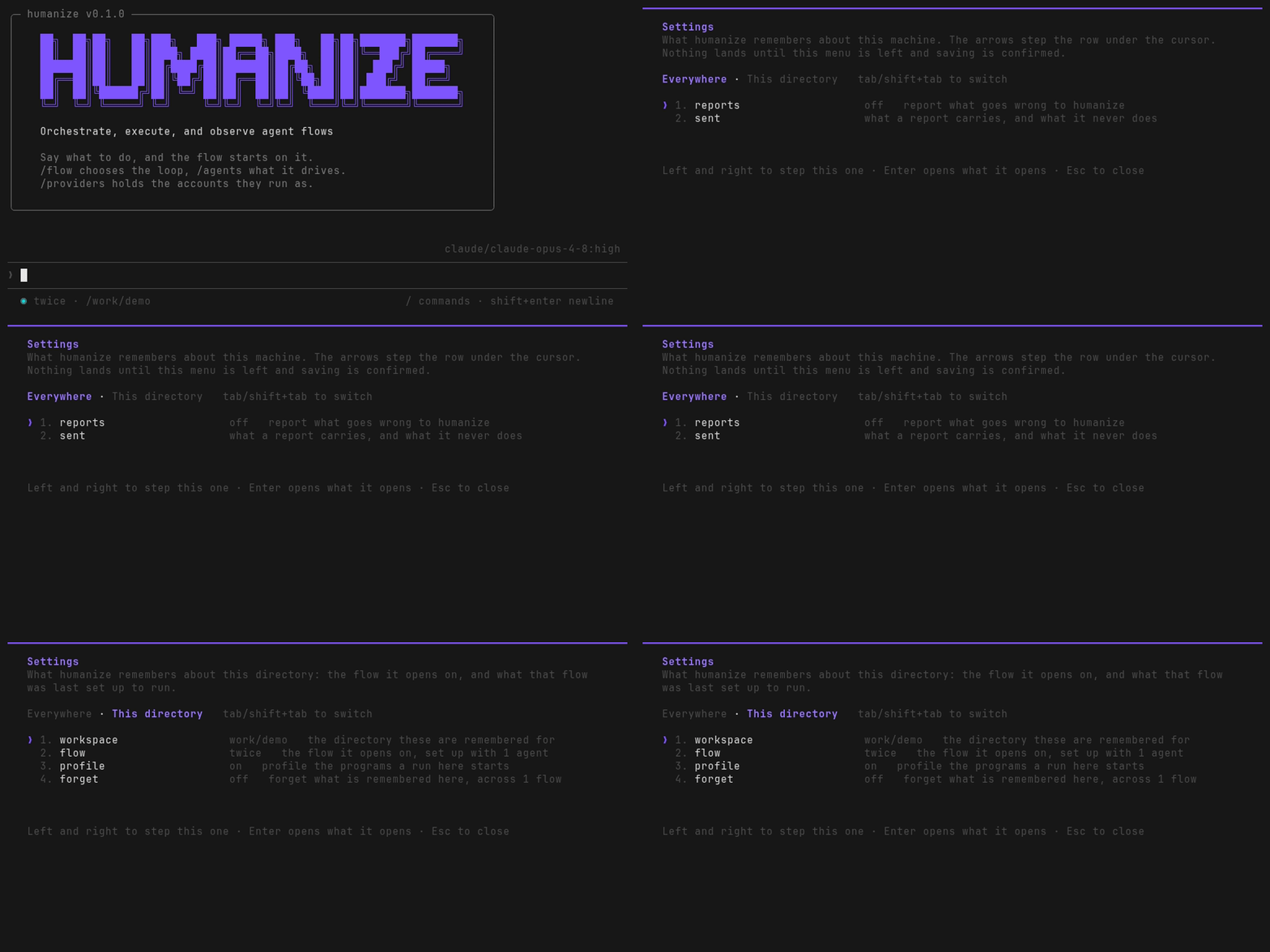
It is the workspace's rather than the machine's. What a run costs in processes is a thing about the project being worked on. A repository whose tests take an hour is a different question from one whose tests take a minute. The switch is read where a run starts, so turning it on holds from the next run rather than the one under way. A run started in that directory by hmz exec is profiled too — it says nothing about what runs, only about whether what runs is watched.
What is sampled, what that costs while the flow runs, and what a trace then makes of it are Tracing › Profiling a run.
From Python it is one property and one call:
from hmz.settings import Settings

Settings().profiling            # whether a run in this directory is profiled
Settings().profiles(on=True)    # written down for it, from now on
Overriding it for one run
The line beats what was remembered, and it starts nothing. The interface opens ready, and the first thing you say is still what starts it:
hmz -f official/rlar -a claude/claude-opus-5:max -a codex/gpt-5.6-sol:highhmz -f official/humanize1:rlcr -c setup.yamlWhat the line says is checked before the interface opens, for a flow that will not load, a config the flow refuses, or the wrong number of agents. A line that is wrong is a line, not a sheet to walk back out of.
hmz exec is set up from none of this. What it runs is what the line names, so an unattended run inherits nothing of what this project was last set up with, which is the point of it. It reads two things from outside the line: whether the runs of this directory are profiled, which is the workspace's rather than the run's, and whether reporting was answered yes. A flow that says it can be picked up is handed what the last run of it here left behind, which is the run's own doing rather than a setting. An unattended run of one is the next stretch rather than the same stretch again.
The first time
With nothing remembered, the interface opens on the chat flow. It opens on the first backend installed here that has said what it runs, at the first model it named and at high. The first model is that CLI's own idea of what it runs by default. high is deliberately not the hardest setting. It is the one to reach for rather than the one to spend before anybody has asked for anything.
See also
- History — the other thing kept between sessions
- Tracing — the trace a profiled run is drawn into
- TUI › What it remembers
- CLI › Files